The .MD version of this guide can be found in the repo:
https://github.com/thevoiceguy/siphon-ai/blob/main/getting_started_with_siphon-ai.md
By the end of this guide, you’ll have a Debian 13 server answering a Twilio phone number, streaming caller audio to Deepgram for transcription, sending the transcript to Groq for a response, and using Deepgram to turn that response into speech. You’ll also have health checks, call records, and SIP traces to help explain what happened on each call.
This edition targets **SiphonAI v0.52.0**, released September 11, 2026. The package, bot checkout, and repository links are pinned to that release. The commands and configuration have been reviewed against the release source, and the TOML syntax has been parsed. The shell examples have not been executed, and this revision still needs a fresh Debian deployment and live Twilio call before being described as end-to-end tested. For upgrades, consult the [CHANGELOG](https://github.com/thevoiceguy/siphon-ai/blob/v0.52.0/CHANGELOG.md) and the documentation for the version you install.
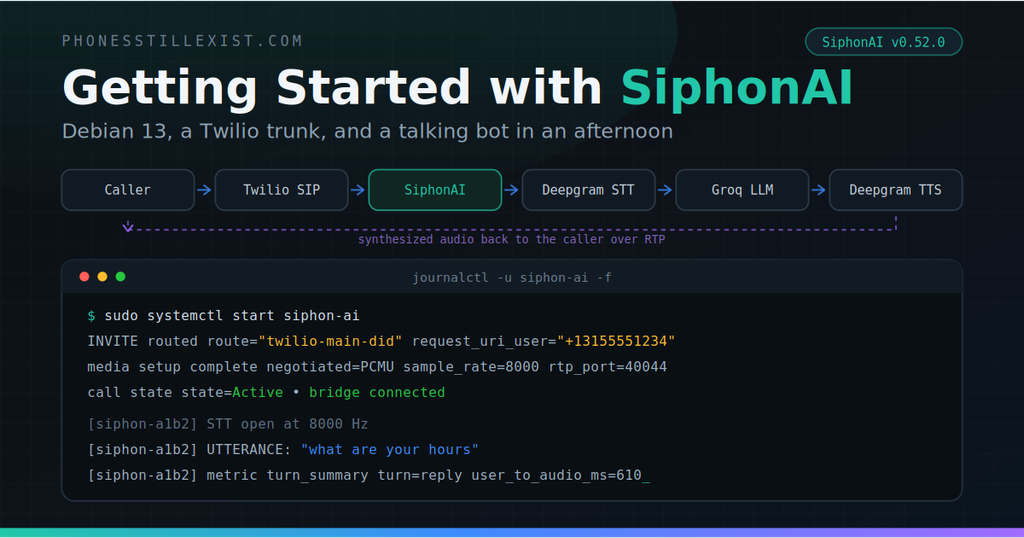
The call path is: caller → Twilio → SiphonAI → Deepgram STT → Groq → Deepgram TTS → SiphonAI → caller. SiphonAI handles SIP and media; the reference bot handles the AI services.
For simplicity, this guide runs SiphonAI and the reference bot on the same server. For production, we recommend running them on separate servers so you can scale each component independently and give the bot and media bridge their own CPU and memory resources. This makes it easier to increase capacity as traffic grows; measure your workload to determine the capacity of each component.
The loopback addresses in this guide assume that shared-server setup. If you separate the components, point SiphonAI’s `ws_url` at the bot’s private network endpoint, bind the bot to a reachable private interface, and secure the connection with WSS and appropriate network access controls.
What you need before you start:
– A fresh Debian 13 (trixie) VM with a **public IPv4 address**, outbound internet access, and a non-root user with `sudo`. Start with one test call and measure CPU and memory before increasing concurrency; the daemon’s published load measurements do not establish capacity for a co-hosted AI bot.
– A Twilio account and a purchased voice-capable number. We’ll create the Elastic SIP Trunk below, or you can use an existing inbound trunk.
– A Deepgram API key with access to STT and TTS, and a Groq API key with access to the model selected below. The bot also supports other OpenAI-compatible chat-completions endpoints.
Budget about an hour if the VM, accounts, and number are ready; firewall setup and provider troubleshooting can take longer. Run the Linux commands below in Bash on the Debian VM. Stop and resolve any failed download, verification, configuration check, or service start before continuing.
—
## 1. Install SiphonAI on Debian 13
This guide uses the release `.deb`. The repository also provides a [source installer](https://github.com/thevoiceguy/siphon-ai/blob/v0.52.0/scripts/install-debian13.sh), but you don’t need a Rust toolchain for this path.
Install the command-line tools used throughout the guide:
sudo apt update

sudo apt install -y ca-certificates curl git openssl jq tcpdump iproute2 procps cosign
### Grab the package
The v0.52.0 release includes static musl tarballs, Debian packages for amd64 and arm64, a CycloneDX SBOM, and signed checksums. A container image is also published on GHCR. See the [release assets](https://github.com/thevoiceguy/siphon-ai/releases/tag/v0.52.0).
Download the package for your VM’s architecture into a new working directory:
VER=0.52.0

ARCH=$(dpkg --print-architecture)

case "$ARCH" in

  amd64|arm64) ;;

  *) printf "Unsupported package architecture: %s\n" "$ARCH"; exit 1 ;;

esac

BASE="https://github.com/thevoiceguy/siphon-ai/releases/download/v${VER}"

DOWNLOAD_DIR=$(mktemp -d /tmp/siphon-ai-release.XXXXXX)

cd "$DOWNLOAD_DIR"

curl -fLO "$BASE/siphon-ai_${VER}-1_${ARCH}.deb"

curl -fLO "$BASE/SHA256SUMS"

curl -fLO "$BASE/SHA256SUMS.cosign.bundle"
Use `cosign` to verify the signature and provenance of `SHA256SUMS` before checking the package. The expected identity names this repository, release workflow, and exact tag:
cosign verify-blob --bundle SHA256SUMS.cosign.bundle \

  --certificate-oidc-issuer https://token.actions.githubusercontent.com \

  --certificate-identity \

  "https://github.com/thevoiceguy/siphon-ai/.github/workflows/release.yml@refs/tags/v${VER}" \

  SHA256SUMS
Then check package integrity. `–ignore-missing` skips the other architecture, tarballs, and SBOM you did not download:
sha256sum -c --ignore-missing SHA256SUMS
# siphon-ai_0.52.0-1_<your-architecture>.deb: OK
The checksum check detects a mismatched download; the signature check additionally establishes the checksum file’s release-workflow provenance. Continue only after cosign verifies the signature successfully and the package checksum reports `OK`.
### Install it
Allow APT’s `_apt` user to traverse the download directory and read the public release package. `mktemp -d` creates a private directory by default; these permissions avoid APT falling back to an unsandboxed read as root. Only the owner retains write access.
chmod 0755 "$DOWNLOAD_DIR"

chmod 0644 "$DOWNLOAD_DIR/siphon-ai_${VER}-1_${ARCH}.deb"

sudo apt install "./siphon-ai_${VER}-1_${ARCH}.deb"
If an earlier run printed `Download is performed unsandboxed as root … couldn’t be accessed by user ‘_apt’` but completed `Setting up siphon-ai`, the package was installed. That notice describes APT’s access to the local `.deb`, not the permissions or sandboxing of the running SiphonAI service. You do not need to reinstall; continue with the sanity checks below. [Temporary-directory permissions](https://www.gnu.org/software/coreutils/manual/html_node/mktemp-invocation.html)
`apt` resolves the two dependencies (`ca-certificates`, `adduser`). The package:
– Installs the binary at `/usr/bin/siphon-ai`.
– Drops a default config at `/etc/siphon-ai/config.toml`. It’s a dpkg conffile, so your edits survive upgrades.
– Creates an empty `/etc/siphon-ai/env` (mode 0640, `root:siphon-ai`) for secrets.
– Creates the `siphon-ai` service user with no login shell, plus `/var/lib/siphon-ai` and `/var/log/siphon-ai`.
– Installs a hardened systemd unit (`NoNewPrivileges`, `ProtectSystem=strict`, `ProtectHome`, `PrivateTmp`) and **enables it but does not start it**.
That last point is deliberate. The shipped template binds SIP on all interfaces, has a catch-all route, and points at a loopback WebSocket endpoint. It does not include a trunk allowlist. Configure the public address, admission rules, and bot before starting the service; an absent allowlist does not disable inbound calls. See the [packaged configuration](https://github.com/thevoiceguy/siphon-ai/blob/v0.52.0/bins/siphon-ai/pkg/config.toml).
Sanity check:
siphon-ai --version

# siphon-ai 0.52.0

sudo siphon-ai check --config /etc/siphon-ai/config.toml
`check` parses and validates the configuration without opening SIP, RTP, or HTTP listeners. Run it before startup and after edits. It catches configuration errors, but it cannot prove firewall reachability, API-key validity, or working audio.
One thing worth knowing if you read the source-install guide in `docs/INSTALL_DEBIAN13.md` alongside this: that path puts the binary at `/usr/local/bin` and the config at `/etc/siphon-ai/siphon-ai.toml`. The `.deb` uses `/usr/bin` and `config.toml`. Same daemon, different paths. It matters in section 4.
—
## 2. The TOML for a Twilio trunk
Replace the shipped `/etc/siphon-ai/config.toml` with this. Two values need substitution: `<YOUR_PUBLIC_IP>` and `<YOUR_TWILIO_NUMBER_E164>`. Keep the number in E.164 format, including its leading `+`.
sudo tee /etc/siphon-ai/config.toml >/dev/null <<'EOF'

[node]

id = "siphon-twilio-1"

# THE most common first-call failure. This goes into the SDP c= line,

# so it's where Twilio sends RTP. Must be the PUBLIC IP, even if the

# NIC has a private address behind cloud NAT. Leave it wrong and the

# call signals fine and plays dead silence.

public_address = "<YOUR_PUBLIC_IP>"

[sip]

listen     = "0.0.0.0:5060"

transports = ["udp"]

user_agent = "SiphonAI/0.52.0"

[media]

# Twilio’s default origination offer lists PCMU, then PCMA.

# These are codec preferences, not regional routing rules.

codecs                  = ["pcmu", "pcma"]

dtmf                    = "rfc2833"

# 2 ports per call. 100 ports = 50 concurrent calls. Open the whole

# range on the firewall for Twilio’s media CIDR (Firewall below).

rtp_port_range          = [40000, 40100]

# RTP watchdog: tear down after 60 s of no inbound media. Keeps an

# abandoned leg from pinning ports.

inactivity_timeout_secs = 60

[bridge]

# The bot. Section 4 puts it on loopback.

ws_url                = "ws://127.0.0.1:8080/"

ws_connect_timeout_ms = 3000

# Forward Twilio’s STIR/SHAKEN verdict when the INVITE carries it.

# Bots must also handle calls where this header is absent.

forward_headers       = ["X-Twilio-VerStat"]

[observability]

enabled     = true

# /metrics, /health, /ready. Loopback only.

http_listen = "127.0.0.1:9091"

# Admin API on its own listener, token-gated. Tokens come from

# /etc/siphon-ai/env. readonly ⊂ operator ⊂ admin.

[admin]

listen = "127.0.0.1:9092"

[[admin.token]]

name  = "ops-ro"

token = "${SIPHON_ADMIN_RO}"

role  = "readonly"

[[admin.token]]

name  = "ops-op"

token = "${SIPHON_ADMIN_OP}"

role  = "operator"

# CDRs. One JSON object per completed call.

[cdr]

enabled = true

[cdr.file]

enabled = true

path    = "/var/log/siphon-ai/cdr.jsonl"

# ── Trunk allowlist ──────────────────────────────────────────────

# Twilio Elastic SIP Trunking doesn't REGISTER and doesn't send

# credentials on origination. Identity is source IP. Anything not

# in this list gets 403 at the SIP layer, before route matching or

# media setup. These are Twilio's regional SIGNALING gateways —

# media comes from a different, much larger range.

[[trunk]]

name       = "twilio"

peer_addrs = [

  "54.172.60.0/30",     # North America Virginia (us1)

  "54.244.51.0/30",     # North America Oregon (us2)

  "54.171.127.192/30",  # Europe Ireland (ie1)

  "35.156.191.128/30",  # Europe Frankfurt (de1)

  "54.65.63.192/30",    # Asia-Pacific Tokyo (jp1)

  "54.169.127.128/30",  # Asia-Pacific Singapore (sg1)

  "54.252.254.64/30",   # Asia-Pacific Sydney (au1)

  "177.71.206.192/30",  # South America São Paulo (br1)

]

# ── Dialplan ─────────────────────────────────────────────────────

# First match wins. Twilio delivers the called number in E.164, so

# request_uri_user is "+13155551234", plus sign included. Scope

# the route to the trunk with register_source = "<trunk name>".

[[route]]

name = "twilio-main-did"

[route.match]

register_source  = "twilio"

request_uri_user = "<YOUR_TWILIO_NUMBER_E164>"

# No catch-all: trunk-admitted calls to any other number return 404.

EOF

sudo chown root:siphon-ai /etc/siphon-ai/config.toml

sudo chmod 0640 /etc/siphon-ai/config.toml
Now the secrets. The `${VAR}` references above are expanded from `/etc/siphon-ai/env`, which the systemd unit loads as an `EnvironmentFile`. Startup fails loudly if a referenced variable is unset.
sudo tee /etc/siphon-ai/env >/dev/null <<EOF

SIPHON_ADMIN_RO=$(openssl rand -hex 32)

SIPHON_ADMIN_OP=$(openssl rand -hex 32)

EOF

sudo chmod 0640 /etc/siphon-ai/env
A couple of things about the allowlist that I’d rather you read here than discover at 2 a.m.:
**Why all eight regions?** Twilio’s own docs say to allow all of them. Your number lives in one edge location, but if that gateway is down, Twilio fails over to another region, and a `/30` you didn’t list means a 403 from you and a fast-busy for the caller. Eight `/30`s is 32 addresses. Just list them all. And re-check Twilio’s [IP addresses page](https://www.twilio.com/docs/sip-trunking/ip-addresses) when they add a region.
**Use `peer_addrs`.** That is the v0.52.0 configuration key. Older comments may still refer to `sources`; follow the [versioned configuration reference](https://github.com/thevoiceguy/siphon-ai/blob/v0.52.0/docs/CONFIG.md). The route’s `register_source = “twilio”` matches the configured trunk name for this deployment.
**Keep both the trunk allowlist and the firewall rules.** With no trunk gate, a public SIP listener can admit arbitrary internet INVITEs to matching routes. Source-IP admission identifies traffic from Twilio’s shared infrastructure; it does not identify your individual Twilio account. The exact-number route limits which destination this guide serves.
Validate before touching Twilio:
sudo bash -c 'set -a; . /etc/siphon-ai/env; set +a; siphon-ai check --config /etc/siphon-ai/config.toml'# Dry-run the dialplan against a synthetic Twilio INVITE.
sudo bash -c 'set -a; . /etc/siphon-ai/env; set +a; \

  siphon-ai route-test --config /etc/siphon-ai/config.toml \

  --to +13155551234 --register-source twilio'
# route-test input:
# request-uri = +13155551234@
# to = +13155551234@
# from = @
# register_source = twilio
# matched route: twilio-main-did
# effective ws_url = ws://127.0.0.1:8080/
# (from [bridge] default)
# effective codecs = [Pcmu, Pcma] ([bridge] default)
# bridge mTLS = off
Use your actual number in `–to`. It should match `twilio-main-did`. If no route matches, check the leading `+` and the exact digits. Repeat the command with a different number, for example `–to +19999999999`: that test should find no matching route, assuming this is not your configured number. The absence of a catch-all is intentional; unmatched calls receive 404. `route-test` models routing only—it does not send an INVITE or exercise the source-IP gate.
That `sudo bash -c ‘set -a; . …’` incantation is how you get the daemon’s `EnvironmentFile` into an interactive shell. Both subcommands need it: they resolve `${VAR}` from the environment, and plain `sudo` doesn’t read `/etc/siphon-ai/env` — only the systemd unit does. Forget the wrapper and you’ll get `config INVALID: environment variable “SIPHON_ADMIN_RO” is referenced by config but not set`. You’ll use the same wrapper again for the admin API.
Keep the service stopped until the bot is listening and the network rules below are in place.
### Reserve the RTP ports
The range `40000–40100` can overlap Linux’s ephemeral port range. Reserve it so unrelated automatic UDP port allocations do not take a port needed by a call. This command preserves the currently active reservations and adds the tutorial’s range. Use the full path because a regular Debian user’s PATH may omit `/usr/sbin`, even when `sudo sysctl` works. The subshell stops on errors, so a failed read cannot silently replace existing reservations:
(

  set -euo pipefail

  /usr/sbin/sysctl net.ipv4.ip_local_port_range

  RESERVED_PORTS=$(/usr/sbin/sysctl -n net.ipv4.ip_local_reserved_ports)

  case ",$RESERVED_PORTS," in

    *,40000-40100,*) ;;

    *) RESERVED_PORTS="${RESERVED_PORTS:+${RESERVED_PORTS},}40000-40100" ;;

  esac

  printf "net.ipv4.ip_local_reserved_ports = %s\n" "$RESERVED_PORTS" \

    | sudo tee /etc/sysctl.d/99-siphon-ai-rtp.conf >/dev/null

  sudo /usr/sbin/sysctl -p /etc/sysctl.d/99-siphon-ai-rtp.conf

  /usr/sbin/sysctl net.ipv4.ip_local_reserved_ports

)
If another sysctl file or configuration-management system also sets this key, consolidate the reservations there so a later reload or reboot does not overwrite them. The RTP pool provides 50 port pairs; that is a port-pool ceiling, not a benchmark for the bot’s capacity. [Deployment reference](https://github.com/thevoiceguy/siphon-ai/blob/v0.52.0/docs/DEPLOY.md)
### Firewall
Firewalls vary too much by host and cloud to walk through here, so this post won’t cover your specific nftables/ufw/security-group config. What has to be open, wherever you enforce it:
| Traffic | Protocol / port | From |
|—|—|—|
| SIP signaling | UDP 5060 | Twilio’s eight regional signaling `/30`s listed in the `[[trunk]]` block above |
| RTP media | UDP 40000–40100 (your `rtp_port_range`) | `168.86.128.0/18`, Twilio’s single global media range |
Two things to get right. The media range is a completely different set of addresses from the signaling `/30`s; opening one and not the other gets you a call that answers and plays silence. And if you’re on a cloud provider with a NAT’d private address on the NIC, the security group needs these same holes in addition to anything on the host.
Keep your SSH management access available from trusted sources. Ports 8080, 9091, and 9092 should remain private; the configuration binds them to loopback. Use SSH forwarding if you need remote access. The plain HTTP admin listener does not encrypt bearer tokens.
The table describes inbound rules. If outbound traffic is restricted, also permit DNS to your resolver, HTTPS/WSS for package downloads and the bot’s providers, and return SIP/RTP traffic to Twilio. Twilio documents UDP media destinations in `168.86.128.0/18` on ports `10000–60000`. Apply the required policy at both the host firewall and cloud network controls. [Twilio network ranges](https://www.twilio.com/docs/sip-trunking/ip-addresses)
—
## 3. Twilio side
All of this is in **Console → Elastic SIP Trunking**. If you’ve done a Twilio trunk before, the only thing SiphonAI-specific here is that you point Origination at the daemon directly. There’s no SBC in front of it. SiphonAI *is* the SIP endpoint.
### Create the trunk
**Trunks → Create new SIP Trunk.** Give it a name. Leave the defaults.
### Origination
Origination is the PSTN → you direction, which is the only one we care about (SiphonAI answers calls; termination is for placing calls out through Twilio, and while the daemon can originate, that’s a different post).
**Origination → Add new Origination URI:**
sip:<YOUR_PUBLIC_IP>:5060;transport=udpPriority 10, weight 10, enabled. A DNS name works too. This tutorial uses UDP signaling and plain RTP: leave **Secure Trunking disabled** for this configuration. Enabling it requires a coordinated TLS and SRTP configuration, covered in the production follow-up. [Twilio trunk configuration](https://www.twilio.com/docs/sip-trunking)
### Numbers
**Numbers → Add a number** and pick the one you bought. Twilio will now send inbound calls for that number as INVITEs to the Origination URI, with the number in E.164 in the Request-URI. That’s what the `request_uri_user = “+1315…”` route matches.
### Termination
Skip it. You don’t need a termination SIP URI, credential list, or IP ACL for inbound-only. If you configure a termination ACL anyway, note it has no effect on origination; Twilio’s origination traffic is authenticated purely by *you* trusting *their* source IPs, which is what the `[[trunk]]` block does.
### Things Twilio does that will surprise you if you’re used to a PBX
– **No REGISTER.** Elastic SIP Trunking doesn’t support it in either direction. If your mental model is “the trunk registers to me,” drop it. Identity is IP.
– **E.164 everywhere.** Called and calling numbers arrive with a `+`. Your dialplan matches on that.
– **PCMU, then PCMA.** That is Twilio’s default origination offer order. The two-codec configuration above supports both. [Twilio codecs](https://www.twilio.com/docs/sip-trunking/codecs)
– **`X-Twilio-VerStat` is conditional.** Twilio documents it on incoming SIP INVITEs that carry SHAKEN PASSporT identity headers. `forward_headers` passes it to the bot when present; absence is a valid case. Independent SiphonAI STIR/SHAKEN verification requires additional configuration and is not enabled here. [Twilio STIR/SHAKEN](https://www.twilio.com/docs/voice/trusted-calling-with-shakenstir)
—
## 4. The Deepgram/LLM bot on the same host
SiphonAI delivers PCM16 audio over its WebSocket bridge protocol and expects correctly framed PCM16 audio back. The other end must speak that protocol, including the `start` handshake and control messages. The repository’s reference bot closes the loop with Deepgram STT → streaming LLM → Deepgram TTS. It is a demo with limitations around queueing and pacing under load; assess those before increasing traffic. The daemon supports configurable WebSocket reconnect, but recovering a connection does not automatically preserve the bot’s conversation state. [Bot source](https://github.com/thevoiceguy/siphon-ai/blob/v0.52.0/examples/deepgram-llm-bot-node/server.js), [Bridge protocol](https://github.com/thevoiceguy/siphon-ai/blob/v0.52.0/docs/PROTOCOL.md)
The bot lives in the repo, not the `.deb`, so you need a checkout. You don’t need to build anything.
sudo install -d -o "$USER" -g "$USER" /opt/siphon-ai-src
git clone --depth 1 --branch v0.52.0 \
  https://github.com/thevoiceguy/siphon-ai.git /opt/siphon-ai-src
git -C /opt/siphon-ai-src describe --tags --exact-match
# v0.52.0
“`
### A user for the bot
The bot holds the Deepgram and LLM API keys and needs outbound HTTPS/WSS. Run it under a separate service account so the daemon does not need access to those credentials. The installer expects the bot account to exist and defaults to `siphon`:
id siphon >/dev/null 2>&1 || \

  sudo useradd --system --user-group --create-home \

    --home-dir /var/lib/siphon-bot --shell /usr/sbin/nologin siphon
### The scripted path
The [bot installer](https://github.com/thevoiceguy/siphon-ai/blob/v0.52.0/scripts/install-bot-debian13.sh) installs Node 22 from NodeSource if a qualifying runtime is absent, installs the npm dependencies, writes the bot environment file and systemd unit, and starts `siphon-bot`. It accepts an existing Node version of 20 or later; Debian 13’s Node 20 package meets the bot’s declared minimum. If you use Debian’s runtime, install both `nodejs` and `npm`.
These settings select the `.deb` configuration path, loopback binding, and Groq. The installer prompts for the Deepgram and Groq keys, so you don’t need to place real keys in a shell command:
cd /opt/siphon-ai-src

SIPHON_AI_TOML=/etc/siphon-ai/config.toml \

BOT_USER=siphon \

BOT_BIND=127.0.0.1:8080 \

UPDATE_DAEMON_WS_URL=no \

BOT_LLM_BASE_URL=https://api.groq.com/openai/v1 \

BOT_LLM_MODEL=openai/gpt-oss-120b \

  ./scripts/install-bot-debian13.sh
The daemon configuration already has the correct WebSocket URL, so no installer edit is needed. `openai/gpt-oss-120b` is listed in [Groq’s supported models](https://console.groq.com/docs/models); your account must have model access and sufficient API quota. The `openai/` prefix is part of the model ID—the request still goes to Groq.
Re-running the installer backs up the existing environment file and service unit before rewriting them. It does not make the source checkout or all surrounding setup steps idempotent. If you reuse an existing installation, check its local edits and ownership first.
When the installer succeeds, continue at **Now start the daemon**, immediately below. It starts the bot, not an inactive SiphonAI daemon. For a manual alternative, complete [Appendix A](#appendix-a-manual-bot-installation), then return here.
### Now start the daemon
The config already points `ws_url` at `ws://127.0.0.1:8080/`, and something is finally listening there.
sudo systemctl start siphon-ai

sudo systemctl status siphon-ai --no-pager

sudo journalctl -u siphon-ai -n 30 --no-pager
If startup fails, inspect the journal: configuration errors, permissions, and port conflicts are common causes. A service being active is only a process-level check; validate readiness and a live call next.
`EnvironmentFile` changes need a service restart: `sudo systemctl restart siphon-ai` for daemon variables, or `sudo systemctl restart siphon-bot` for bot variables. SIGHUP reloads supported daemon settings such as routes, gateways, webhooks, and CDR sinks; it does not re-read systemd’s environment file. Re-run `check` after edits and consult the [reload reference](https://github.com/thevoiceguy/siphon-ai/blob/v0.52.0/docs/CONFIG.md) for settings that require a restart.
—
## 5. Validate
In rough order of “cheap and local” to “costs a phone call.”
### Is the daemon alive?
curl -fsS http://127.0.0.1:9091/health    # ok

curl -fsS http://127.0.0.1:9091/ready     # ready

# Pull the admin tokens into the shell, then hit the status endpoint.

sudo bash -c 'set -a; . /etc/siphon-ai/env; set +a; \

  curl -fsS -H "Authorization: Bearer $SIPHON_ADMIN_RO" http://127.0.0.1:9092/admin/v1/status | jq'

# {"version":"0.52.0","uptime_secs":41,"active_calls":0,"registrations":{...},"draining":false,"hep_enabled":false}
Note `/admin/*` is on **9092**, not 9091. Hitting it on the metrics port 404s, which has confused everyone at least once, me included.
Is the bot listening where the daemon expects?
sudo ss -ltnp 'sport = :8080'# LISTEN 0 511 127.0.0.1:8080 … users:((“node”,…))
These checks confirm the daemon is available and the bot has a listening socket. They do not verify Deepgram/Groq authentication or prove that the audio path works.
### Does the trunk gate work?
Install SIPp, packaged as `sip-tester`, and make one local test call. Port 5080 keeps the test client separate from the daemon’s listener:
sudo apt install -y sip-tester

sipp -sn uac 127.0.0.1:5060 -m 1 -s +13155551234
You should get a **403 Forbidden**. That’s correct: `127.0.0.1` isn’t in the Twilio allowlist, so the daemon rejected the INVITE before it touched a route or a port. In SIPp’s output this looks like a *failure* — it counts 1 “Failed call” and aborts with `Aborting call on unexpected message … received ‘SIP/2.0 403 Forbidden’` after a `100 Trying`. The 100 is automatic and pre-policy; the 403 with `Server: SiphonAI/0.52.0` in it is the gate working. If the INVITE is admitted, inspect the loaded configuration: a missing gate or an allowlist entry that includes loopback could explain it. That is not the expected policy for this guide. A timeout also does not prove rejection; inspect the service, socket, and firewall.
Watch it happen in the journal:
sudo journalctl -u siphon-ai -n 5 --no-pager# … WARN … INVITE rejected: no trunk matched (403 Forbidden) peer=127.0.0.1:…
Trunk-gate rejections occur before bridged-call admission, so do not expect `siphon_ai_invites_total` to count them as accepted INVITEs. The journal warning is the direct signal. If you separately enable [audit logging](https://github.com/thevoiceguy/siphon-ai/blob/v0.52.0/docs/AUDIT.md), the rejection emits `invite_rejected` with reason `no_trunk`; audit logging is not enabled by this tutorial.
The SIP capture ring may observe rejected signaling, but the bridge-call ladder endpoint shown later resolves active or recent bridge call IDs. Do not assume that an INVITE rejected before a bridge call exists can be retrieved through that endpoint. Use the journal or a packet capture for this gate test.
For a full local bridged test, you need both a temporary loopback trunk and a route matching that trunk and test destination. Adding only the loopback trunk will still fail the exact Twilio route in this guide. Use the [load harness](https://github.com/thevoiceguy/siphon-ai/tree/v0.52.0/test-harness/load) for a separate test configuration, and remove temporary access afterward.
### Is Twilio actually reaching you?
Start a capture, then call your number from a cell phone:
sudo tcpdump -ni any -s0 'udp port 5060 or udp portrange 40000-40100'The command above shows packet endpoints and flow. To read SIP method/status lines and SDP in the terminal, use a separate signaling-only capture:
sudo tcpdump -ni any -s0 -A 'udp port 5060'Look for an INVITE, a successful response and ACK, and RTP in both directions. Use the direction as seen at the SiphonAI host:
| What you see | What to investigate next |
|—|—|
| No signaling arrives | Origination URI, number-to-trunk assignment, DNS, routing, host firewall, and cloud network rules |
| INVITE followed by 403 | Read the journal’s rejection reason; check Twilio’s source address against the loaded allowlist |
| INVITE followed by 404 | Check the called number, leading `+`, and `register_source`; no catch-all is configured |
| INVITE followed by 200, RTP outbound only | SiphonAI’s advertised public address/port, inbound firewall, and NAT |
| INVITE followed by 200, RTP inbound only | Bot output, daemon playout, negotiated remote media destination, and outbound networking |
| RTP in both directions, but silence | Payload contents, codec/framing, playout, and endpoint behavior; packets alone don’t prove audible speech |
SiphonAI’s SDP address tells Twilio where to send caller audio. A wrong `public_address` therefore normally breaks Twilio → SiphonAI media. If transcripts are appearing in the bot, that inbound audio path is working. [Twilio media settings](https://www.twilio.com/docs/sip-trunking#media-settings)
Twilio’s console call log shows you the SIP response code your endpoint returned, and the PCAP download is there when you need Wireshark.
### The call lifecycle, both sides
Two terminals, one call.
# terminal 1
sudo journalctl -u siphon-ai -f# terminal 2
sudo journalctl -u siphon-bot -fDaemon side, look for routing, media setup, bridge connection, and teardown. These are illustrative log excerpts, with timestamps and some fields omitted:
“`
INVITE routed route=”twilio-main-did” from_user=”+13155559876″ request_uri_user=”+13155551234″ register_source=”twilio”
inbound call media setup complete negotiated=PCMU sample_rate=8000 rtp_port=40044
call state state=Initializing
call state state=Connecting
call state state=Active
bridge connected
…
call state state=Terminating
call ended cause=CallerHangup
“`
The line to look for is `bridge connected`. If the call ends before a useful exchange, inspect both journals for the actual reason. Check `sudo ss -ltnp ‘sport = :8080’` and the configured `ws_url`; a listening socket alone does not prove the WebSocket handshake or provider connections succeeded.
Bot side, look for STT opening, greeting audio, transcripts, and reply metrics. These examples show the shape of the output, not guaranteed timings:
“`
[siphon-a1b2] START from=+13155559876 to=+13155551234 audio=pcm16le@8000Hz/20ms
[siphon-a1b2] STT open at 8000 Hz
[siphon-a1b2] metric stt_open +123ms
[siphon-a1b2] metric tts_first_byte +789ms turn=greeting latency_ms=468
[siphon-a1b2] metric first_outbound_frame +812ms turn=greeting user_to_audio_ms=812
[siphon-a1b2] UTTERANCE: “what are your hours”
[siphon-a1b2] metric llm_first_token +5430ms turn=reply latency_ms=328
[siphon-a1b2] metric turn_summary +7400ms turn=reply user_to_audio_ms=610 …
[siphon-a1b2] metric call_summary +12345ms barge_in_count=0 clear_count=0 dropped_frame_count=0
“`
Every metric record contains `metric <event> +Nms k=v …`, so you can search the journal for `turn_summary` and compare calls. In this bot, `user_to_audio_ms` starts when a reply begins processing after Deepgram’s `UtteranceEnd` event and ends when the first audio frame is sent by the bot. It excludes the preceding speech-end detection delay, and queued replies also exclude their earlier queue wait.
The configured `utterance_end_ms` is 1000. Perceived caller silence includes that detection stage, processing, network transport, and playout. A logged `user_to_audio_ms=610` therefore does not establish a 610 ms end-to-end conversational response time. Measure the full caller experience separately. [Metric implementation](https://github.com/thevoiceguy/siphon-ai/blob/v0.52.0/examples/deepgram-llm-bot-node/server.js)
### After the call
Pull the CDR:
“`bash
sudo tail -n 1 /var/log/siphon-ai/cdr.jsonl | jq“`
Or, if you’d rather not SSH around log files, the admin API keeps the last 50 in memory:
sudo bash -c 'set -a; . /etc/siphon-ai/env; set +a; \

  curl -fsS -H "Authorization: Bearer $SIPHON_ADMIN_RO" http://127.0.0.1:9092/admin/v1/cdrs/recent | jq ".cdrs[0]"'
And this is the one I’d have killed for on every SBC I’ve ever run: the per-call SIP ladder, straight from the daemon, for a call that already ended.
CALL_ID=’paste-the-call_id-value-here’ # Use call_id, not sip_call_id.
sudo bash -c 'set -a; . /etc/siphon-ai/env; set +a; \

  curl -fsS -H "Authorization: Bearer $SIPHON_ADMIN_OP" \

  "http://127.0.0.1:9092/admin/v1/calls/$1/sip"' bash "$CALL_ID" \

  | jq '.messages[] | {ts_ms, direction, src, dst, msg: (.payload | split("\r\n")[0])}'
# … {“direction”:”in”, “msg”:”INVITE sip:+1315…@… SIP/2.0″, …}
# … {“direction”:”out”,”msg”:”SIP/2.0 100 Trying”, …}
# … {“direction”:”out”,”msg”:”SIP/2.0 200 OK”, …}
# … {“direction”:”in”, “msg”:”ACK …”, …}
Each entry carries the full raw message in `payload`; the `split` pulls the first line so the ladder reads at a glance. One display quirk to expect: with the usual wildcard bind, your own end shows as `0.0.0.0:5060` in `src`/`dst` — siphon-rs stamps the local side with the socket’s address, and the ring knowingly treats an unspecified IP as “this node” so direction still attributes correctly. The peer side is always the real address.
That needs the `operator` token because the payloads contain raw SIP, including any `Authorization` headers. The defaults retain ladders for 50 completed calls, with a separate recent-CDR ring used to resolve their bridge IDs. This history is in memory and disappears on restart; a known call’s trace can also be evicted or truncated. Check `count` and `truncated` in the full response when investigating missing messages. For persistent, searchable history, see [HEP](https://github.com/thevoiceguy/siphon-ai/blob/v0.52.0/docs/HEP.md) and the [Homer example](https://github.com/thevoiceguy/siphon-ai/tree/v0.52.0/examples/homer-stack).
### Two things that will bite you on a first test call
**The bot keeps interrupting itself.** If speech keeps getting cut off and the bot log is full of `barge-in: dropping playout`, first check whether you are testing on a speakerphone. The bot’s voice comes out the speaker, into the mic, the daemon’s VAD fires `speech_started`, and the bot cancels its own playout. Use a handset or a headset. A handset or headset helps isolate acoustic feedback, but echo can also occur in production. Check endpoint echo cancellation and audio routing before tuning speech-detection thresholds; a higher threshold can mask feedback while missing real interruptions.
**One-way audio, caller hears nothing.** If transcripts appear in the bot, caller audio is reaching it. Look for `tts_first_byte` and `first_outbound_frame`, then check daemon playout and RTP leaving toward Twilio’s negotiated media address and port. If RTP leaves but the caller still hears silence, inspect payloads and the remote path. If the bot receives no caller audio, investigate inbound RTP and SiphonAI’s advertised SDP address instead.
—
## What you have now
One box, two services, a phone number that answers. The daemon handles SIP and media; the bot handles transcription, responses, and synthesized speech. To replace the reference bot with another pipeline, provide a WebSocket adapter that implements [SiphonAI’s bridge protocol](https://github.com/thevoiceguy/siphon-ai/blob/v0.52.0/docs/PROTOCOL.md). A generic WebSocket audio endpoint is not automatically compatible.
Before expanding this into a production service, follow the [deployment guide](https://github.com/thevoiceguy/siphon-ai/blob/v0.52.0/docs/DEPLOY.md) for TLS signaling, SRTP media, admission limits, and operational setup. Enabling Twilio Secure Trunking requires configuring both sides; changing only the Origination URI does not encrypt the media. Keep the bot’s queueing, pacing, provider limits, and conversation recovery in scope too.
For observability beyond one node:
– [HEP and Homer](https://github.com/thevoiceguy/siphon-ai/blob/v0.52.0/docs/HEP.md) add correlated signaling, media quality, and call records. With a HEP collector configured, **v0.52.0 adds node-health events** keyed by `node:<node.id>` and a status heartbeat every 60 seconds by default. `[hep].node_status_interval_secs = 0` disables only that heartbeat; positive values must be at least 5 seconds. HEP is optional and is not enabled in this tutorial.
– [Dashboards and alerts](https://github.com/thevoiceguy/siphon-ai/tree/v0.52.0/examples/observability) help track capacity, call quality, and exporter failures. A successful UDP send cannot prove that a collector received a packet.
– [Operations documentation](https://github.com/thevoiceguy/siphon-ai/blob/v0.52.0/docs/OPERATIONS.md) covers JSON logging and OTLP. If you adopt the [fail2ban integration](https://github.com/thevoiceguy/siphon-ai/tree/v0.52.0/contrib/fail2ban), keep its log-format assumptions in mind: the shipped filter expects text logs, and switching the daemon to JSON requires a compatible filter.
When upgrading, change the package version and bot checkout together, review the intervening release notes, run the configuration checks, and repeat the live call test. Use documentation for the installed release when a moving repository page differs.
—
## Appendix A: Manual bot installation
Use this instead of the scripted bot installer in section 4. First complete the pinned checkout and service-account steps there. When finished, return to [Now start the daemon](#now-start-the-daemon).
**Node.** The bot declares Node 20 or later. Debian 13’s packaged Node 20 meets that minimum; this manual recipe chooses Node 22 from NodeSource to match the installer’s fresh-runtime path. If you already have a qualifying Node runtime and npm, you can keep it.
curl -fsSL https://deb.nodesource.com/setup_22.x | sudo -E bash -

sudo apt install -y nodejs

node --version   # v22.x
**Dependencies.** The bot uses `@deepgram/sdk`, `openai`, and `ws`. Install them from the pinned checkout:
cd /opt/siphon-ai-src/examples/deepgram-llm-bot-node

npm install
# The bot account needs read/traverse access to this directory.
sudo -u siphon test -r /opt/siphon-ai-src/examples/deepgram-llm-bot-node/server.js**Keys.** Use a separate environment file readable by root and the bot’s service group. Open it in an editor and substitute your real keys in the example below:
sudo install -d -o root -g root -m 0755 /etc/siphon-bot

sudo touch /etc/siphon-bot/env

sudo chown root:siphon /etc/siphon-bot/env

sudo chmod 0640 /etc/siphon-bot/env

sudoedit /etc/siphon-bot/env

dotenv

DEEPGRAM_API_KEY=replace_with_your_deepgram_key

BOT_LLM_BASE_URL=https://api.groq.com/openai/v1

BOT_LLM_API_KEY=replace_with_your_groq_key

BOT_LLM_MODEL=openai/gpt-oss-120b

BOT_BIND=127.0.0.1:8080
# Optional; keep values quoted so Bash and systemd can both read them.
# BOT_SYSTEM_PROMPT=”You are a phone assistant for Acme Plumbing.”
# BOT_GREETING=”Thanks for calling Acme. How can I help?”
“`
This selects Groq for the LLM while STT and TTS stay on Deepgram. For other endpoint configurations, see the [bot setup reference](https://github.com/thevoiceguy/siphon-ai/blob/v0.52.0/docs/BOT_LOCALHOST_SETUP.md). Measure latency with your own call path and provider account.
**Foreground smoke test first.** Before systemd, run it by hand so you can see what it prints. This wrapper sources the environment file as Bash; keep any multiword prompt or greeting values quoted as shown above. (If you ran the scripted installer above, the service is already up and holding the port — `sudo systemctl stop siphon-bot` first or you’ll get `EADDRINUSE`, and restart it after.)
cd /opt/siphon-ai-src/examples/deepgram-llm-bot-node

sudo -u siphon bash -c 'set -a; . /etc/siphon-bot/env; set +a; exec node server.js'
# [llm] model=openai/gpt-oss-120b base_url=https://api.groq.com/openai/v1 …
# siphon-ai bot listening on ws://127.0.0.1:8080/
One trap worth calling out: if you copy-paste keys with a literal `…` in them from a doc, the bot refuses to start with a “non-ASCII characters” error rather than dying inside the WebSocket library. That’s on purpose.
Press Ctrl-C after confirming the startup messages. A successful startup does not verify the provider keys until the bot uses them during a call.
**systemd unit.**
sudo tee /etc/systemd/system/siphon-bot.service >/dev/null <<'EOF'

[Unit]

Description=SiphonAI Deepgram/LLM voice agent

After=network-online.target

Wants=network-online.target

[Service]

Type=simple

User=siphon

Group=siphon

WorkingDirectory=/opt/siphon-ai-src/examples/deepgram-llm-bot-node

EnvironmentFile=/etc/siphon-bot/env

ExecStart=/usr/bin/node server.js

Restart=always

RestartSec=5

StandardOutput=journal

StandardError=journal

LimitNOFILE=65536

[Install]

WantedBy=multi-user.target

EOF

sudo systemctl daemon-reload

sudo systemctl enable --now siphon-bot

sudo systemctl status siphon-bot --no-pager
Continue at [Now start the daemon](#now-start-the-daemon), then complete section 5.
Be First to Comment